


Findmykids: Parental Control
4.612.82K Reviews
App Specs
- Version
- 2.11.74-google
- Updated On
- License
- Free
- Downloads
- 50,000,000+
- Developer
- LETEM LTD
- Categories
- Parenting
- Platform
- Android, iOS
Screenshots
 Analysis by AppCompare
When I choose a family location app, I start with a practical question: will it help me make a calm decision, or just give me another screen to check? Findmykids: Kids GPS Tracker is aimed at parents who want a clearer picture of a child’s whereabouts while allowing them some independence. I’d consider it most useful for everyday transitions—getting to school, visiting a friend, or coming home—rather than as a substitute for talking through safety rules together.
What I would decide before installing it
First, think about who will carry the tracked device and whether it will be with your child consistently. Location information is only useful when the phone or connected GPS watch is nearby, switched on, and available to report its position. If your child often leaves a device in a backpack, at home, or with a relative, the app cannot fill in that gap. I’d agree as a family where the device belongs and what you’ll do if it is forgotten.
Second, consider whether you need location checks, a way to review where a child has been, or a quick way to get their attention. Findmykids combines these kinds of parental oversight, so it may suit a family that wants them in one place. It is less compelling if you only need occasional coordination and already have a routine that works through calls or ordinary messages.
There is also a relationship question, not just a technical one. With an older child, I’d explain what I check and why, and agree on when location sharing is for safety rather than scrutiny. That conversation can prevent a tracking tool from becoming a source of avoidable tension. For a younger child, I’d keep the explanation simple: the phone helps the family stay in touch when plans change.
Where this family tracker is useful
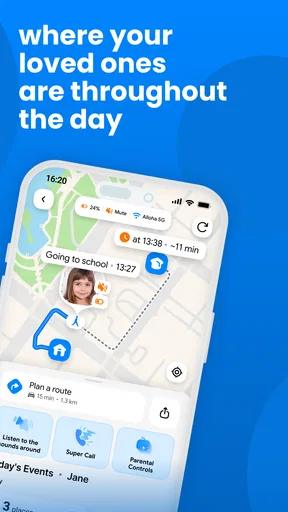
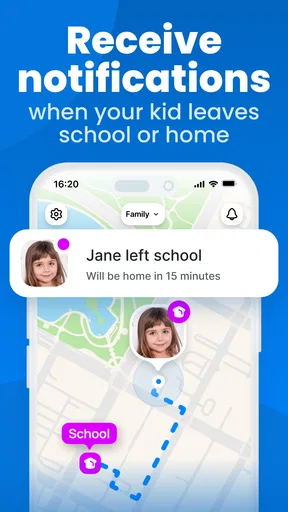
In an ordinary school-day scenario, I might check the map when the usual journey home is taking longer than expected, then use the app’s contact options before assuming something is wrong. A zone notification can be useful when a child arrives at or leaves a familiar place, but I would treat it as a prompt to check in, not proof that everything is fine. A location alert tells me about a device’s movement; it cannot explain why plans changed.
The history feature has a different purpose from live checking. It can help when a child says they went directly from one place to another and you want to understand the route or clarify a misunderstanding. I’d use that sparingly and discuss what I noticed instead of turning a route history into a constant investigation. Used thoughtfully, it can support a practical conversation about agreed plans; used without trust, it can undermine the independence the app is meant to make easier.
Findmykids is made by LETEM LTD and sits in the parenting category. It is free to download, has an Everyone age rating, and supports Android from version 8.0. Its current Android version is 2.10.40-google. The app has a 4.6 average from around 1.9 million ratings and over 50 million installs, which gives a sense of its reach, though popularity alone does not tell me whether it fits a particular family.
Worth Reading Before You Choose

Flipboard Shows What News Apps Must Do Beyond the Feed

Switching to Android Auto Means Rethinking Your Driving Routine

Google Calendar Makes a Crowded Week Easier to Manage

Ludo King Makes the Most of the Minutes Between Plans

Baby Panda World Brings Quick Play to Modern Phones, but Its Game Library Feels Busy

ESPN’s Live Game View Makes Following Close Games Easier
Keeping Track with Ease
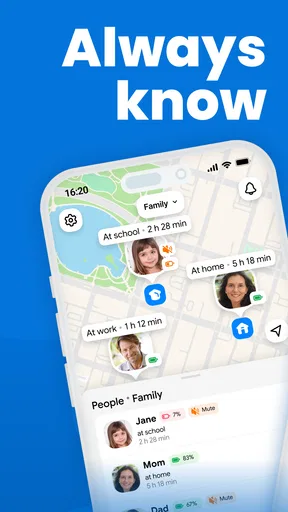
The app is a lifesaver for parents like me who want to keep tabs on their little adventurers. Once you download Findmykids, setting it up is a breeze. You just need to install it on your kid's phone or connect it to their GPS watch. Voila! You’re ready to start tracking.
What’s cool is that it doesn’t just show their location. The app provides a detailed history of where they've been, which is fantastic for those "where were you?" moments. You can see if they really were at Timmy’s house or if they made a pit stop at the candy store.
Notifications and Alerts
Another feature I love is the geofencing option. You can set up safe zones, and if your child leaves that area, you get an instant notification. It’s like having a personal assistant keeping tabs for you.
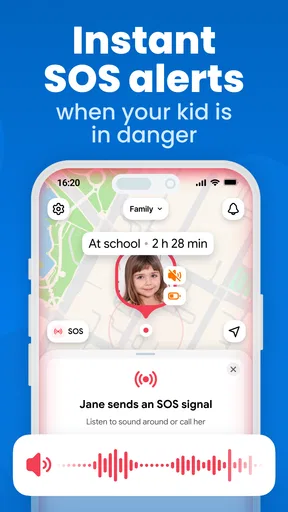
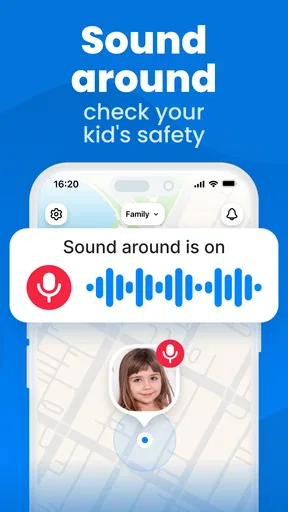
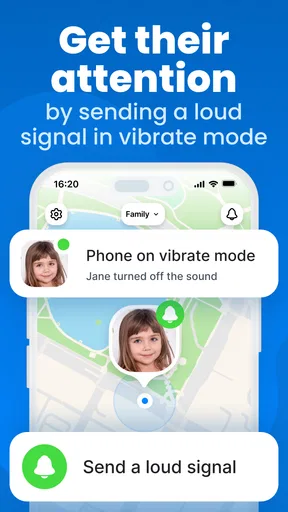
Plus, the app has a sound feature. If your kid’s not picking up calls, you can make their phone ring at full volume. Handy, right? Especially if they have a knack for ignoring calls when they’re in the middle of a game.
Staying Connected
Safety aside, the app also lets you send messages and monitor the battery level of your kid’s device. It’s a simple way to ensure they don’t run out of juice when they need it most.
And hey, if you’re worried about privacy, the app takes it seriously. All data is encrypted, so your family’s info stays safe and sound. You can feel secure using it without fearing unwanted snooping.
Making the alerts work for your routine
I’d keep the first setup modest: choose only the places that matter to your family, such as home or school, rather than drawing a boundary around every stop. Too many alerts can become background noise, and then the one that deserves attention is easier to miss. It also helps to agree on what counts as an expected departure, so a club session or a change of pickup plan does not automatically turn into a worry.
Before relying on notifications, I’d test the routine together on a normal day. Confirm that the child’s device is being carried, that the parent knows how the alert appears, and that both people understand what to do next. The useful outcome is not simply receiving a ping; it is having a shared response, such as sending a message or calling the other adult responsible for pickup.
The battery display is especially practical when interpreted as a planning cue. If it is running low before a long trip home, I’d ask the child to conserve charge and let them know the plan, rather than treating the indicator as a guarantee that the phone will remain reachable. Location tracking depends on the child’s device being usable, so a low battery is a real limitation, not a minor detail.
How it compares with familiar alternatives
Compared with relying only on calls and texts, a family tracker can reduce repeated “where are you now?” check-ins during a predictable journey. The trade-off is that it asks the family to maintain another app-based routine and to be comfortable with location sharing. If your child reliably replies and the day’s plans are simple, ordinary messaging may be enough and may feel less intrusive.
Compared with a basic location-sharing tool, Findmykids is more specifically oriented toward a parent keeping track of a child, with features such as zones, location history, device battery information, messaging, and the sound option described above. A general-purpose map may be a better fit when several adults simply want to share locations with one another on equal terms. I would choose based on the family relationship and the job to be done, not on the assumption that more monitoring is always better.
A GPS watch can make sense for a younger child who does not carry a phone, and the app can connect to a child’s GPS watch. But a watch is not automatically the right answer for every family: the child needs to wear and charge it, while a phone may already be part of an older child’s routine. I’d compare the device the child will actually keep with them, rather than choosing a tracking setup on paper.
Costs, expectations, and the effort of changing tools
The app is free to download, but it offers in-app purchases ranging from about $0.39 to $349.99 per item. I would check the purchase options in the app before treating the free download as the full long-term cost, and decide which functions the family genuinely needs before paying for anything. A paid option is not automatically worthwhile if the basic routine already answers the family’s needs.
Switching from another tracker also has a human cost. Children may need time to get used to a new expectation, and parents may need to recreate familiar places and notification habits. I’d make the change at a calm point in the week, walk through the setup together, and avoid introducing it for the first time during a rushed school pickup. That gives everyone a chance to learn the routine before it matters.
It is also worth deciding what would make you stop using it. If alerts create more stress than reassurance, if a child does not carry the device reliably, or if the family’s trust is worsening, another approach may be healthier. You can return to agreed check-in times and direct communication; a location app should support those habits, not replace them.
Why You’ll Love It
Overall, the Findmykids: Kids GPS Tracker app is like a tech-savvy babysitter in your pocket. It’s reliable, user-friendly, and genuinely gives peace of mind. Whether you're a parent to a curious toddler or an independent teen, this app bridges the gap between freedom and safety.
My recommendation is strongest for parents whose children travel independently and whose family wants location context alongside a way to check in. It is less suited to anyone expecting perfect certainty from a phone, or to families who are uncomfortable with ongoing tracking. For an older child, I’d make consent and boundaries part of the decision; for a younger one, I’d focus on a clear, simple explanation and a dependable device routine.
So, if you want to ditch the constant worrying and let your kids explore while staying connected, give this app a whirl. Trust me, your future self will thank you.
Pros
- Accurate real-time location tracking.
- User-friendly interface for easy navigation.
- Geo-fencing alerts for safety zones.
- Battery level indicator for child's device.
- Customizable notifications and alerts.
Cons
- Requires constant internet connection.
- Can drain device battery quickly.
- Limited features in free version.
- Dependent on child's device compatibility.
- May raise privacy concerns for some users.
FAQs for Findmykids: Parental Control
What is Findmykids: Kids GPS Tracker used for?
Findmykids: Kids GPS Tracker is designed to help parents monitor their children's location and ensure their safety. It uses GPS technology to provide real-time location updates, allowing parents to see where their kids are at any given time. This app is ideal for parents who want peace of mind knowing their children’s whereabouts.
How accurate is the GPS tracking in the app?
The GPS tracking in Findmykids is highly accurate, typically providing location updates within a few meters of the child's actual location. However, accuracy can vary depending on factors like the child’s environment, phone signal strength, and whether the device is indoors or outdoors. Regular updates ensure you have the most recent data.
Is Findmykids: Kids GPS Tracker secure and private?
Yes, Findmykids prioritizes user privacy and data security. The app uses encrypted connections to transmit data, ensuring that location information is only accessible to authorized users. Parents can also set permissions and manage who has access to their child's location data, offering an added layer of security.
Does the app work without an internet connection?
Findmykids requires an internet connection to provide real-time location updates and other features. While the GPS function itself doesn’t need the internet, the app uses data to send and receive information. Therefore, for optimal performance, a stable internet connection is recommended, especially in areas with poor network coverage.
Can the app be used internationally?
Yes, Findmykids can be used internationally, making it ideal for families who travel. The app functions anywhere there’s a cellular or Wi-Fi connection, allowing parents to track their child’s location across different countries. However, users should be aware of potential roaming charges depending on their mobile data plan.


